
Did you know that you can add multiple people to a single case? Yes!!! If you have a case where there’s a couple of people from the end user site, the integrator, and a consultant all involved, it is possible to add all those people to the case.
How? When viewing the case, go to the related tab, and scroll down to the “Case Contact Rolls.”
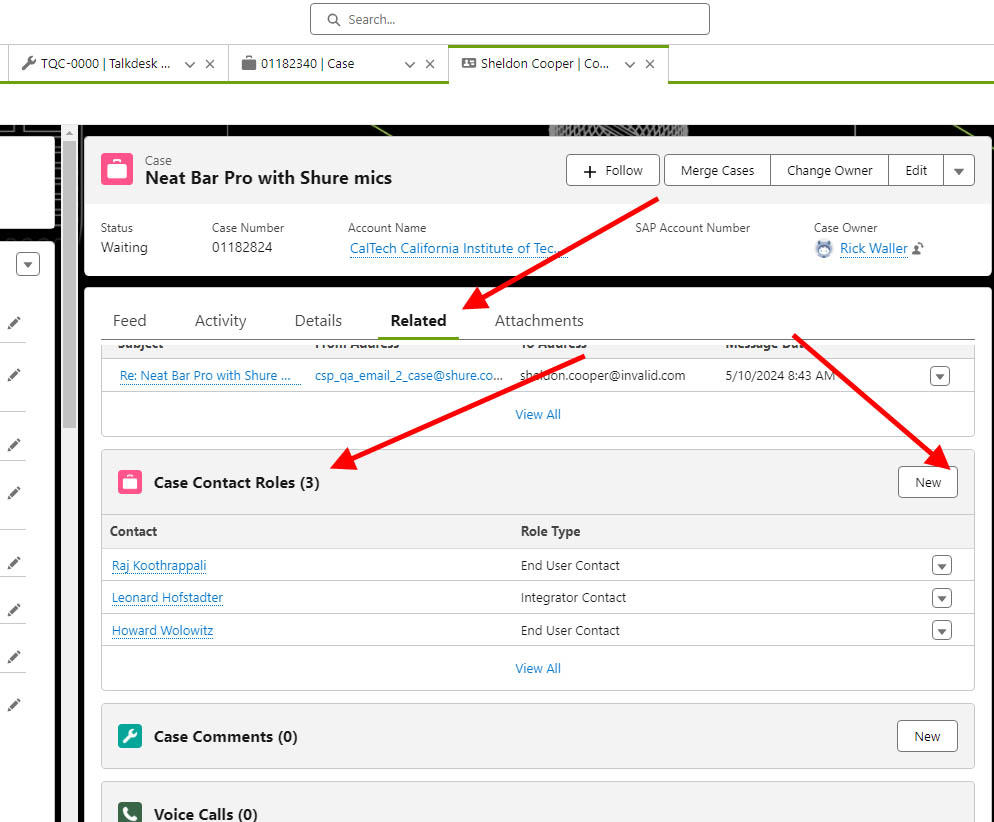
Click on “NEW”. Then search for an existing contact or create a new contact. Select if this contact is the end user, integrator, or consultant.
What does this do? This will allow this case to show up on all of the contact records in the list. That makes it a lot easier to find the case if anyone of these contacts calls in. It also provides better visibility to the case if a sales manager is looking at the contact record.
Notes:
- There will still only be one PRIMARY contact related to the case.
- This does NOT automatically add these contacts as “cc:” on any emails.
